A meeting AI that doesn't interrupt
SAI
Summary
No one can talk to an AI in the middle of a meeting. So SAI asks first – “Shall I…?” Only accepted suggestions do any work, and only their results reach the notes.
- 10
- 32
- 1 blue
Overview
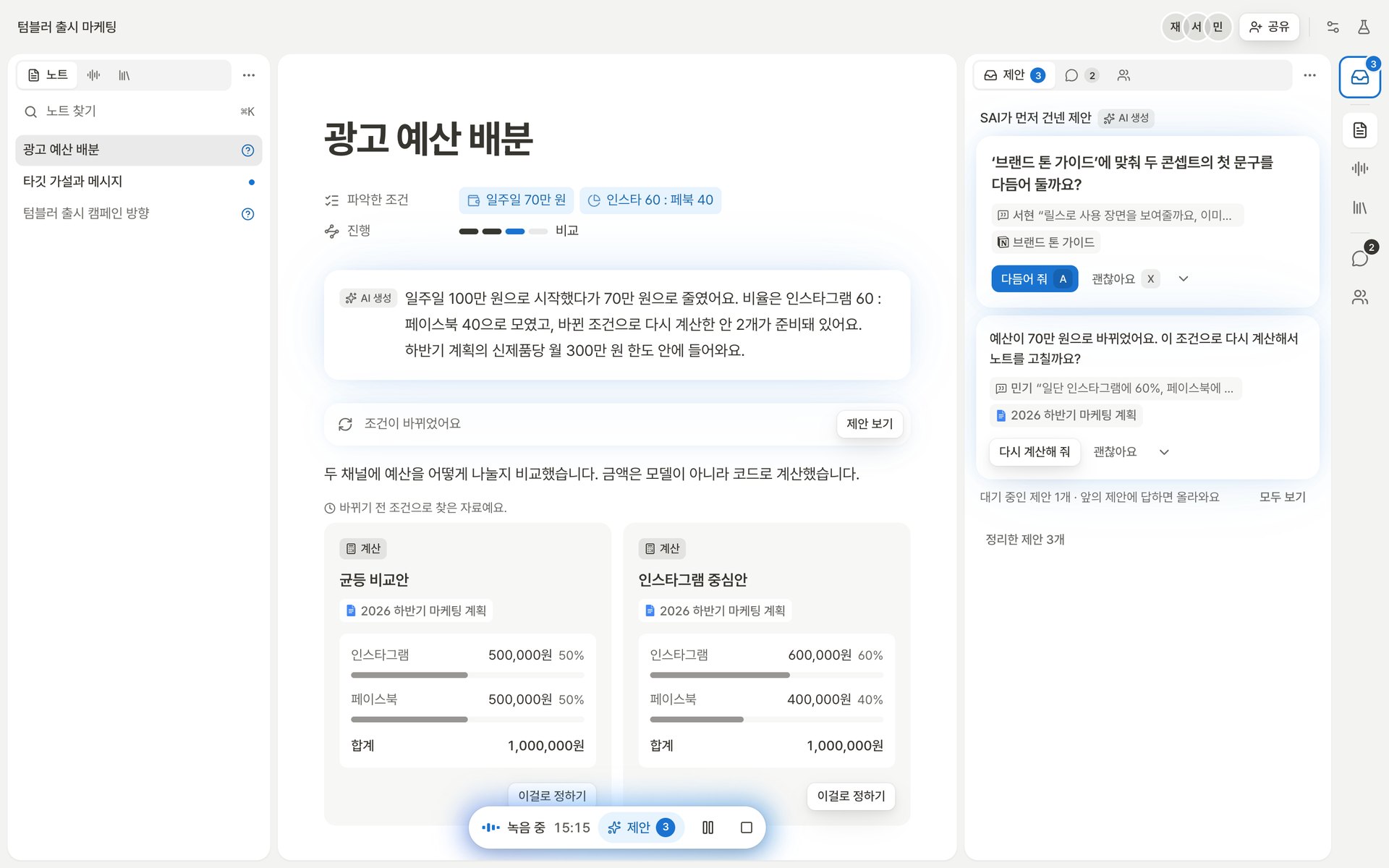
People in the same room join one meeting from their own laptops and phones, with a single device listening. The AI raises a suggestion when something useful comes up, and people check it at a glance and accept it by hand, without stopping the conversation.
Key decisions
Notes never write themselves – suggest, accept, then note
Text an AI writes on its own only gives people in a conversation more to check.
The AI asks first, works only once accepted, and writes only the result. Suggestions never mix into the note.
No evidence, no suggestion
People accept only when they can see why it's asking now.
A suggestion without a source utterance or material isn't shown, and at most two wait for an answer at once.
One accent: blue
Mid-meeting, the screen gets a glance. Where to look has to be obvious at once.
Kinds and states differ only in grey value; only what needs pressing now is blue. There is no red.
What the AI made, it marks with light
Korea's AI Basic Act requires disclosure, and it had to be clear what the AI wrote.
AI output carries a blue glow and an 'AI-generated' badge.
Material waits for the reader
A number can't be read if it changes or disappears while you read it.
New results queue behind a banner instead of replacing the card in view. Unverified values keep an 'unverified' tag instead of vanishing.
Everything happening now, in one island
Recording state and alerts scattered over the screen pull people out of the conversation.
One capsule at the bottom holds recording state and every alert; a blocked action shows its reason and a button to fix it.
Design system
- Eight principles – space instead of lines, one blue, AI as light, material waits, say what's unknown, lines only when they carry information, never clip a shadow, official logos as they are.
- Tokens – primitive → semantic → component. A 4px grid and only two shadows.
- Components – suggestion cards (offered, working, done, dismissed), three kinds of material card (evidence, calculation, proposal) whose fill shows confidence, the meeting island, a consent gate, QR sharing.
- Live style guide –
/design-systeminside the app shows the tokens and principles as they run.
Quality
- Tests – 32 Playwright tests on desktop (1440×900) and mobile; any console error fails a test. axe checks WCAG 2.1 AA.
- Contrast – colours that failed the check (secondary text 4.49, white on the accent 3.88) were fixed to 5.05 and 4.77.
- Shortcuts while typing Korean – handled by key code, so they work mid-composition.
Where a person steps in
- The AI offers first – what it heard that might be useful comes out as a card. An offer is only an offer; it never becomes a note by itself.
- Only what is accepted stays – a card someone takes becomes part of the notes. The meeting is never interrupted, and the decision stays with the room.
- Always with its evidence – each card carries the utterance it came from, and confidence shows as the card's fill. What it doesn't know, it says it doesn't know.
Reflection
- Keep only what's essential. After building the whole thing once, close to 9,000 lines came out across 90 files.
- Still to do – this demo is frontend only; real speech recognition, search and sync are for the build phase.